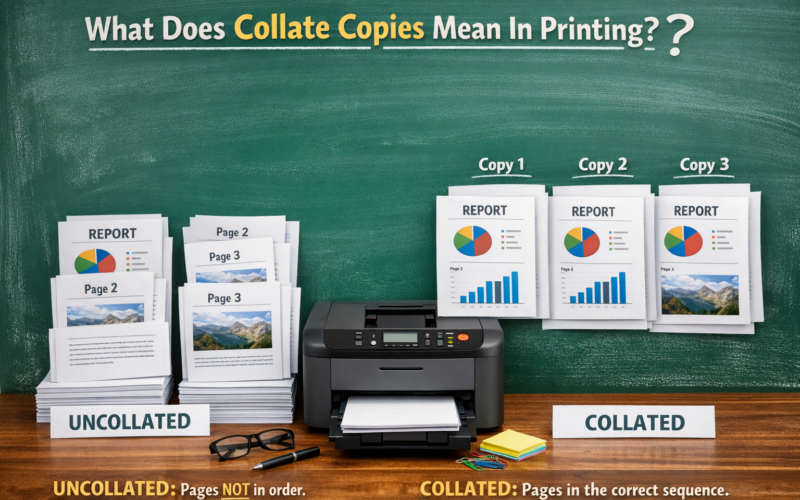
Collate is a simple option that you can use while printing to sort your printing work. If you desire to print multiple document files then this option is very helpful. When you give the print command you will see the collate copies option. Most of the users don’t know about it. This is one of the most misunderstood settings in printing. People often use this setting without understanding it properly. This setting can save time, reduce mistakes, and get your documents printed in the right order if you know how and when to use it.
Confused about when you should use the collate copies option? Don’t know why this option appears while printing? Desire to know about collate meaning in printing? If the answer to all the above questions is then you are at the right destination. Further, we are going to explain in detail what collate copies meaning, how it works, what happens when you collate, and much more.
What Is Collate Meaning In Printing?
The collate meaning in printing refers to how printed pages are arranged when you print multiple copies of a multipage document. This simple feature is very useful for reports, assignments, manuals, and presentations.
How it works
If the collate option is on when you are printing then your printer will print the pages in the correct sequence for each copy. If the collation is off then the printer will print the same page together before moving to the next page. In simple words we can say that if you turned on collate option then you need not to arrange each copy of your multipage document manually. The printer will print the document in the correct sequence.
For example: if you are document has 5 pages and you desire to print three copies of the document then
- If collation option is on:
Copy 1 → Page 1, Page 2, Page 3, Page 4, Page 5
Copy 2 → Page 1, Page 2, Page 3, Page 4, Page 5
Copy 3 → Page 1, Page 2, Page 3, Page 4, Page 5
- If collation option is off:
Page 1, Page 1, Page 1
Page 2, Page 2, Page 2
Page 3, Page 3, Page 3
Page 4, Page 4, Page 4
Page 5, Page 5, Page 5
Collate Copies Meaning is simple, you will get each copy well arranged. No manual arrangement is needed.
What Happens When You Collate Vs Uncollate?
| Feature | Collate | Uncollate |
| Meaning | Prints each copy as a complete set in correct page order | Prints the same pages together before moving to the next page |
| Page Order | Page 1 → Page 2 → Page 3 (for each copy) | Page 1, Page 1 → Page 2, Page 2 → Page 3, Page 3 |
| Example (3 pages, 2 copies) | Copy 1: 1-2-3 Copy 2: 1-2-3 | Page 1 ×2 Page 2 ×2 Page 3 ×2 |
| Manual Sorting Needed | No | Yes |
| Best For | Reports, books, assignments, manuals | Single-page prints, grouped forms |
| Time Efficiency | Saves time after printing | Takes extra time to arrange pages |
| Professional Output | High | Lower if not manually arranged |
| Common Usage | Offices, schools, businesses | Print shops, bulk page printing |
| Stapling/Binding Ready | Yes | No |
| Printing Speed | Slightly slower | Slightly faster |
When Should You Use Collate Copies?
You should use collation option when:
- Printing reports, essays, or books
- Printing multiple handouts
- Preparing meeting documents
- Printing legal or official papers
You may turn it off when:
- Printing single-page flyers
- Printing forms that need to be grouped by page
Importance of Collate Copies
The collate copies meaning is closely related to printing order. It simply means arranging multiple copies of a document so that each copy is complete and in the correct page order. It is a very important feature in printing. It helps in:
- Saving time by avoiding manual sorting
- Keeping pages in correct order
- Preparing documents for stapling or binding
- Improving the professional look of printed materials
- Reducing printing errors
FAQs
What does collate copies mean?
It means printing each copy of a document with all pages arranged in correct order.
Should I turn collate on or off?
Turn it on for multi-page documents. Turn it off for single-page prints.
Does collating affect printing speed?
Collating may slightly slow printing, but it saves time by avoiding manual page sorting.
Are collate copies useful for home printing?
Yes, especially for school projects, forms, and reports.
Is collate the same as duplex printing?
No. Collate controls page order, while duplex printing controls printing on both sides of paper.